
Discord
Two-Way Discord Conversations & Community Automation
Bring Discord into your GoHighLevel workflow. Connect a server and channel to any sub-account and let conversations, contacts, and automations flow both ways. Sync members as contacts, message and manage roles from workflows, and trigger automations straight from Discord activity — perfect for communities, memberships, and customer engagement.
Key Features
Everything You Need
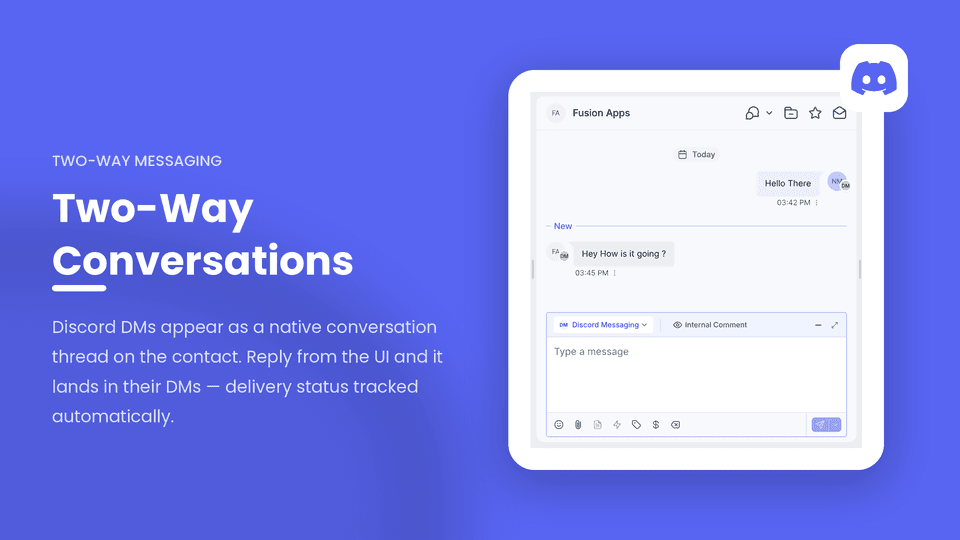
Two-Way Conversations
Discord DMs appear as a native conversation thread on the contact record. Replies sent from the conversation UI are delivered straight to the member's Discord DMs, with delivery status tracked automatically.
Send Messages from Workflows
Post a message to your connected Discord channel as a workflow action, with merge fields like contact name and custom field values resolved automatically.
Automatic Contact Sync
Members of your connected Discord server are synced in as contacts, complete with their Discord ID, username, avatar, and join date stored as custom fields.
Role Management from Workflows
Add or remove Discord roles on a member directly from a workflow — after a tag is applied, a purchase completes, or a pipeline stage changes — with a live dropdown of your server's roles.
Trigger Workflows from Discord Activity
Kick off a workflow the moment a member sends a message on Discord, with the message content and sender details available to use inside the workflow.
Membership Auto-Provisioning
Grant a customer access to your Discord community straight from a workflow. Already joined? The role is applied instantly. Haven't joined yet? A personal invite link is generated and the role is applied automatically the moment they join.
What's New
- Automatic Access Revocation — Remove a member's role or fully remove them from your server directly from a workflow, so who has paid access always matches who's actually paying.
- Self-Healing Sync — Built-in repair tools detect and fix broken contact links and re-sync automatically.
- Member Activity Tracking — Automatically records each member's last Discord activity as a custom field, so you can build win-back segments and workflows without leaving GHL.
- Agency-Friendly Rollout — Set a default server and channel connection at the agency level and have it automatically applied to every new sub-account as it's created.
Ideal For
Communities and membership businesses managing paid Discord access
Teams wanting Discord conversations and contact data inside GoHighLevel
Agencies rolling out Discord automation across multiple sub-accounts
Installation Guide
How to Set Up
Please follow the steps below to install the Discord app:
Install the Discord app from the GoHighLevel Marketplace.
During onboarding, click Authorize with Discord and grant the bot access to your Discord server.
Select the Discord server and channel you'd like to connect to this sub-account, then click Save.
If you're managing an agency, you can set a default server and channel connection at the agency level so it's automatically applied to every new sub-account as it's created.
In Discord, go to Server Settings → Roles and drag the bot's role above any role you want it to manage from GoHighLevel workflows.
- Discord only allows a bot to grant or remove roles positioned below its own role — this is a Discord platform rule. If a role action fails with a "Missing Permissions" error, this is the fix.
Once connected, you can send and receive Discord DMs from the contact record, trigger workflows from Discord messages, and manage roles and membership using the Discord workflow actions.
If you have any questions or need any assistance, please feel free to reach out to hello@fusionapps.io
Screenshots
See It in Action
Full access. No usage limits. Cancel anytime.
Available on the GoHighLevel Marketplace
Install on GoHighLevel